
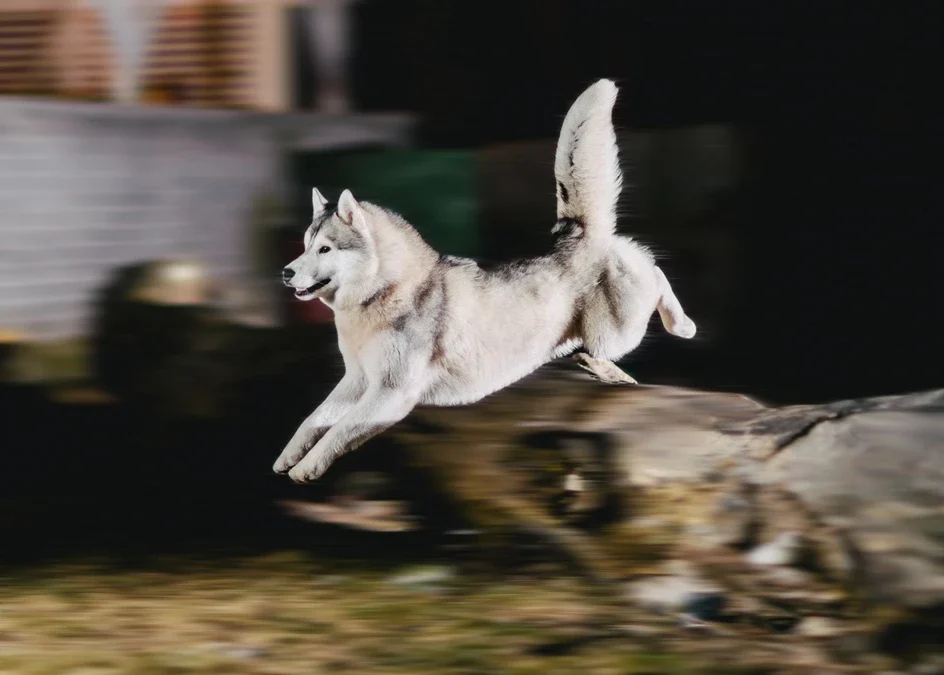
Capturing the intensity and dynamism of fast-paced sequences is a hallmark of compelling filmmaking. Motion blur in action scenes is a powerful visual technique that helps convey speed, chaos, and realism. When used thoughtfully, it can transform ordinary footage into immersive, energetic moments that keep viewers on the edge of their seats.
This article explores how filmmakers and videographers can harness the creative potential of motion blur to elevate action sequences. We’ll discuss the underlying principles, practical camera settings, and post-production strategies, as well as common mistakes to avoid. For those interested in understanding the distinction between different types of blur, the guide on motion blur vs camera shake provides valuable insights.
Understanding Motion Blur for Dynamic Sequences
At its core, motion blur is the streaking or smearing of moving objects within a frame, caused by the relative motion between the subject and the camera during exposure. In action-packed scenes, this effect helps simulate the way our eyes perceive rapid movement, making the visuals feel more natural and less mechanical.
When applied intentionally, blur can:
- Emphasize speed and direction
- Heighten emotional impact
- Guide the viewer’s focus
- Mask imperfections in choreography or effects
The right balance is essential. Too much blur can make footage confusing, while too little may result in stiff, unrealistic action.

Camera Settings for Effective Motion Blur in Action Scenes
Achieving the right amount of blur starts with camera setup. The most critical factor is shutter speed. A slower shutter speed allows more movement to be captured within each frame, creating visible streaks. For action sequences, filmmakers often use shutter angles between 180° and 270° (or shutter speeds around 1/48 to 1/60 for 24fps footage) to produce a cinematic look.
Key considerations include:
- Shutter Speed: Lower speeds increase blur; higher speeds freeze motion. Experiment to find the sweet spot for your scene.
- Frame Rate: Standard cinematic frame rates (24 or 25 fps) tend to look more natural with some blur. Higher frame rates (like 60 fps) may require even slower shutter speeds to maintain the effect.
- Camera Movement: Panning or tracking shots can enhance the sense of velocity when combined with subject motion.
- Lighting: Slower shutter speeds let in more light, so adjust aperture and ISO to avoid overexposure.
For more technical tips and creative ideas, the article on how to use motion blur in photography and video offers a comprehensive overview.
Creative Uses of Motion Blur in Action Sequences
Directors and cinematographers use motion blur for more than just realism. It can be a storytelling device, shaping the mood and energy of a scene. Here are some creative applications:
- Fight Scenes: Subtle blur on punches or kicks makes impacts feel heavier and more visceral.
- Chase Sequences: Blurred backgrounds during fast camera moves amplify the sense of speed.
- Transitions: Quick whip pans with intentional blur can create seamless, energetic cuts between shots.
- Subject Isolation: Keeping the main character sharp while blurring the environment draws attention to their actions.
The key is to match the amount and style of blur to the narrative tone. For gritty, chaotic scenes, more pronounced streaks may be appropriate. For precise, stylized action, a controlled approach works best.

Post-Production Techniques for Enhancing Motion Blur
While capturing blur in-camera is ideal, sometimes it’s necessary to enhance or add the effect during editing. Modern software offers several tools for this purpose:
- Directional Blur Filters: Most editing suites include effects that simulate movement in a specific direction.
- Frame Blending: Combining multiple frames can create a smoother, more natural blur.
- Rotoscoping: Isolating moving objects and applying blur selectively helps maintain clarity where needed.
- Plugins: Specialized plugins can automate complex blur effects for advanced sequences.
Use these tools sparingly and always reference real-world motion for authenticity. Overdone digital blur can look artificial and distract from the action.
Common Mistakes and How to Avoid Them
Even experienced filmmakers can run into pitfalls when working with motion blur. Here are some frequent issues and solutions:
- Excessive Blur: Too much can obscure important details. Test different shutter speeds and review footage on a large screen.
- Inconsistent Application: Sudden changes in blur from shot to shot can break immersion. Maintain continuity throughout the sequence.
- Poor Lighting: Slower shutter speeds require careful exposure control. Use ND filters or adjust lighting to avoid blown highlights.
- Ignoring Storytelling: Blur should serve the narrative, not just aesthetics. Always consider how it supports the emotional tone of the scene.
For a deeper dive into related visual effects and their industrial applications, you might also explore topics like the importance of industrial vision inspection or factory machine learning applications explained for broader context on imaging technologies.
Frequently Asked Questions
What is the ideal shutter speed for capturing motion blur in fast-moving scenes?
The optimal shutter speed depends on the speed of your subject and the desired effect. For most cinematic action, a shutter angle of 180° (about 1/48s at 24fps) is standard. Slower speeds increase blur but risk losing detail, while faster speeds reduce blur and can make movement look choppy.
Can motion blur be added in post-production if it wasn’t captured on set?
Yes, many editing programs offer tools to simulate blur after filming. However, in-camera blur usually looks more natural. When adding it digitally, use reference footage and apply the effect selectively to avoid an artificial appearance.
How do I prevent motion blur from making my footage look messy?
The key is moderation and intentionality. Test your settings, review footage frequently, and ensure that blur enhances rather than overwhelms the action. Keep your main subjects as sharp as possible while allowing backgrounds or secondary elements to blur for added energy.