

Capturing motion blur can transform ordinary scenes into dynamic, eye-catching images that stand out on social platforms. Whether you’re photographing bustling city streets, flowing water, or creative portraits, understanding how to use blur effectively is essential for photographers aiming to boost their Instagram presence. This guide covers practical advice, camera settings, and creative techniques to help you master the art of motion in your photography.
If you’re interested in expanding your skills even further, you may want to explore motion blur for social media content for more targeted strategies and inspiration.
Understanding Motion Blur for Social Media Success
Motion blur is a photographic technique that intentionally captures the movement of a subject or camera, resulting in streaks or soft trails. When used thoughtfully, it adds energy, emotion, and storytelling depth to your images—qualities that resonate with Instagram audiences. Unlike static shots, blurred photos evoke a sense of action and atmosphere, making them more likely to engage viewers scrolling through their feeds.
To create compelling images with this effect, it’s important to balance creativity with technical control. The following sections break down the essential steps and considerations for achieving professional-looking results.
Essential Camera Settings for Capturing Motion
The foundation of any successful blurred shot lies in your camera settings. Here are the key factors to consider:
- Shutter Speed: The most critical setting for motion effects. Slower shutter speeds (typically between 1/10 and several seconds) allow moving subjects to blur, while faster speeds freeze action. Experiment with different values to achieve your desired look.
- ISO: Lower ISO values (100–400) help reduce noise, which is especially important in longer exposures. If shooting in low light, you may need to increase ISO, but be mindful of grain.
- Aperture: A smaller aperture (higher f-number) increases depth of field and lets in less light, which can help you use slower shutter speeds during the day.
- Stabilization: Use a tripod or stable surface to keep the camera steady when you want only the subject to blur. For intentional camera movement, hand-holding is encouraged.

Creative Approaches to Blurred Photography
There are several ways to introduce movement into your images, each producing a distinct visual effect. Here are some popular techniques:
Subject Movement
Have your subject move through the frame while you keep the camera still. This is ideal for capturing runners, cyclists, cars, or wildlife. The background remains sharp, emphasizing the motion of the subject.
Camera Movement (Panning)
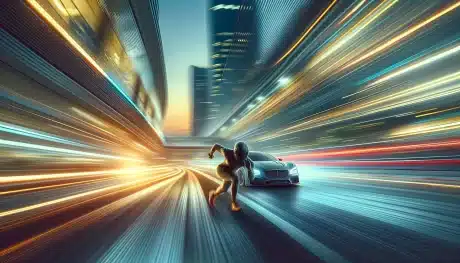
Panning involves moving the camera along with a moving subject during exposure. This keeps the subject relatively sharp while blurring the background, creating a sense of speed and direction. Practice smooth, steady movements for best results.
Intentional Camera Shake
For abstract or artistic effects, try moving the camera deliberately during the shot. Vertical or horizontal shakes, spins, or zooms can produce unique patterns and textures, perfect for creative Instagram posts.
Long Exposure for Light Trails
Shooting at night or in low light with a long exposure can capture light trails from cars, city lights, or fireworks. Use a tripod and remote shutter to avoid unwanted shake.
Tips for Standout Instagram Posts Featuring Motion
To make your images more appealing and shareable, keep these best practices in mind:
- Plan Your Composition: Think about how the movement will guide the viewer’s eye through the frame. Leading lines, diagonals, and negative space can all enhance the sense of motion.
- Edit Thoughtfully: Use editing tools to enhance contrast, saturation, and sharpness where needed, but avoid over-processing. Subtle adjustments can help your subject pop against the blur.
- Use Hashtags and Captions: Pair your photo with relevant hashtags and a caption that tells the story behind the shot. This increases discoverability and engagement.
- Post at Optimal Times: Share your work when your audience is most active to maximize reach and interaction.
For more gear-specific advice, check out motion blur camera gear recommendations to find the right equipment for your style.
Common Challenges and How to Overcome Them
Even experienced photographers encounter obstacles when working with movement. Here’s how to address some frequent issues:
- Unwanted Camera Shake: If your entire image is blurry, use a tripod or enable image stabilization. A remote shutter or timer can also help reduce shake.
- Overexposure: Shooting with slow shutter speeds in bright light can result in washed-out images. Use a neutral density (ND) filter to limit light entering the lens, or adjust your aperture and ISO.
- Focus Problems: Autofocus may struggle with moving subjects. Try pre-focusing on a spot where the subject will pass, or use manual focus for more control.
- Unclear Subject: Make sure there’s a clear focal point in your composition. Too much blur can make the image confusing, so balance sharp and soft areas thoughtfully.
Learning from the Experts
Studying the work of skilled photographers can provide inspiration and practical insights. For a deeper dive into capturing movement, visit this comprehensive guide to motion blur techniques for additional examples and tutorials.
If you’re interested in urban scenes, don’t miss motion blur urban photography for tips on capturing the energy of city life.
Advanced Ideas for Creative Storytelling
Once you’re comfortable with the basics, experiment with advanced concepts to push your creativity further:
- Combine Lighting Effects: Use artificial or colored lights to add drama and mood to your moving subjects. For inspiration, see motion blur creative lighting.
- Tell a Visual Story: Use movement to convey emotion or narrative. Think about how the direction, speed, and context of the blur can support your message. More on this can be found in the motion blur storytelling techniques guide.
- Experiment with Editing: Blend multiple exposures or use selective sharpening to highlight specific areas, creating a unique look that stands out on Instagram.
FAQ
What is the best shutter speed for creating motion blur in photos?
The ideal shutter speed depends on your subject and the amount of blur you want. For subtle effects, try 1/30 to 1/10 second. For more pronounced streaks, use slower speeds like 1 second or longer. Always test different settings to see what works best for your scene.
Can I achieve motion blur with a smartphone camera?
Yes, many modern smartphones offer manual controls or dedicated modes for long exposure. You can also use third-party apps that allow you to adjust shutter speed. Using a tripod or stable surface is recommended for best results.
How do I keep my subject sharp while blurring the background?
This effect, known as panning, involves moving your camera along with the subject’s motion during exposure. Use a slower shutter speed and practice tracking the subject smoothly. It may take several attempts to get the timing and sharpness just right.
Do I need special equipment for motion blur photography?
While you can achieve great results with basic gear, a tripod, remote shutter, and ND filter can make the process easier and more consistent. For more information, see the motion blur camera gear recommendations.