
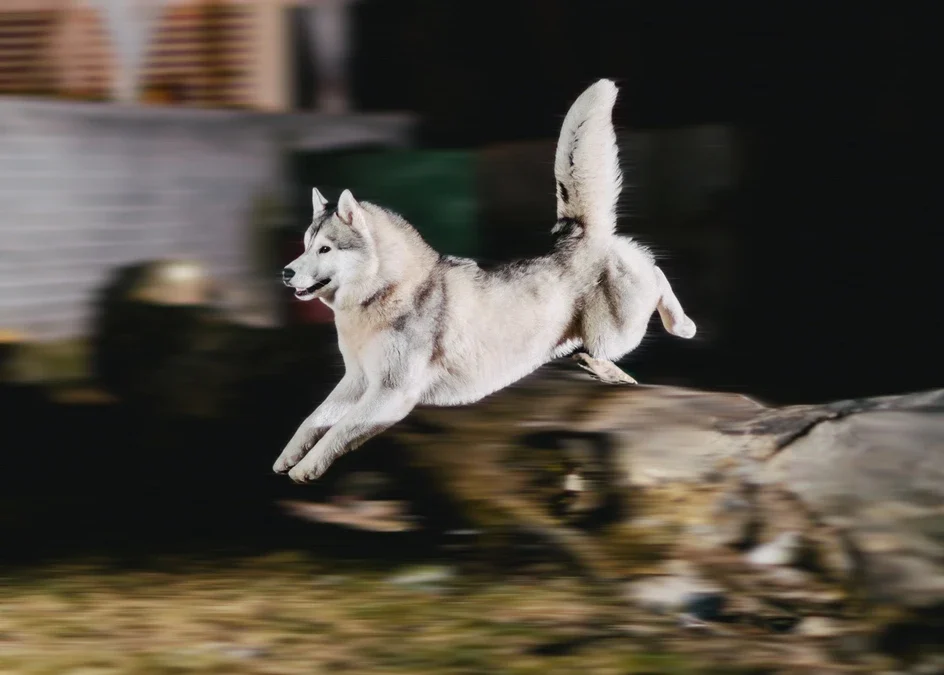
Capturing motion blur with slow shutter speed is a creative technique that allows photographers to convey movement and energy in their images. By intentionally using a slower shutter, moving subjects appear blurred while stationary elements remain sharp, resulting in dynamic and expressive photos. This approach is widely used in genres ranging from sports and wildlife to street and landscape photography. Understanding how to control and use motion blur can elevate your images, helping you tell more compelling visual stories.
For those interested in refining their technique, exploring motion blur composition examples can provide valuable inspiration and practical ideas for your next shoot.
Understanding the Basics of Motion Blur
Motion blur occurs when a moving subject is captured with a shutter speed that is slow enough to record its movement as a streak or blur. The effect is most pronounced when there is a significant difference in speed between the subject and the camera’s sensor. While traditional photography often aims for sharpness, embracing blur can add atmosphere, drama, and a sense of time passing.
The amount of blur depends on three main factors: the speed of the subject, the length of the exposure, and whether the camera itself moves during the shot. Using a tripod can help keep the background sharp while allowing the subject to blur, but handheld shots can also create interesting effects if both camera and subject are in motion.
How Shutter Speed Influences Motion Blur
The key to achieving motion blur with slow shutter speed lies in adjusting your camera’s shutter settings. Shutter speed is measured in fractions of a second (such as 1/30s, 1/4s, or even several seconds). The slower the shutter, the more movement will be recorded in the frame.
- Fast shutter speeds (1/500s or faster) freeze action, minimizing blur.
- Moderate shutter speeds (1/60s to 1/125s) may show slight blur in fast-moving subjects.
- Slow shutter speeds (1/30s or slower) create pronounced blur, especially with rapidly moving subjects.
Experimenting with different speeds allows you to control the degree of blur and achieve the effect that best suits your creative vision.

Techniques for Creating Artistic Blur
There are several ways to use slow shutter speeds to introduce blur into your images. Here are some popular techniques:
- Panning: Move the camera along with a moving subject (such as a cyclist or car) while using a slow shutter. This keeps the subject relatively sharp while blurring the background, emphasizing motion.
- Static Camera, Moving Subject: Place your camera on a tripod and let the moving subject blur across the frame. This is effective for capturing flowing water, passing crowds, or animals in motion.
- Intentional Camera Movement (ICM): Deliberately move the camera during a long exposure to create abstract patterns and textures.
Each method produces a different look, so experimenting with various approaches can help you discover new creative possibilities. For more tips on settings, the motion blur settings for beginners guide is a helpful resource.
Choosing the Right Settings for Motion Effects
Getting the exposure right when using slow shutter speeds can be challenging, especially in bright conditions. Here are some tips to help you achieve the desired blur without overexposing your images:
- Lower ISO: Use the lowest ISO setting available to reduce sensitivity to light and avoid overexposure.
- Smaller Aperture: Set your aperture to a higher f-number (such as f/11 or f/16) to limit the amount of light entering the lens.
- Neutral Density (ND) Filters: These filters reduce the amount of light reaching the sensor, allowing for longer exposures even in daylight.
- Manual Mode: Shooting in manual mode gives you full control over shutter speed, aperture, and ISO, making it easier to fine-tune your exposure.
Balancing these settings will help you maintain image quality while achieving the desired amount of blur.
Creative Uses of Motion Blur in Photography
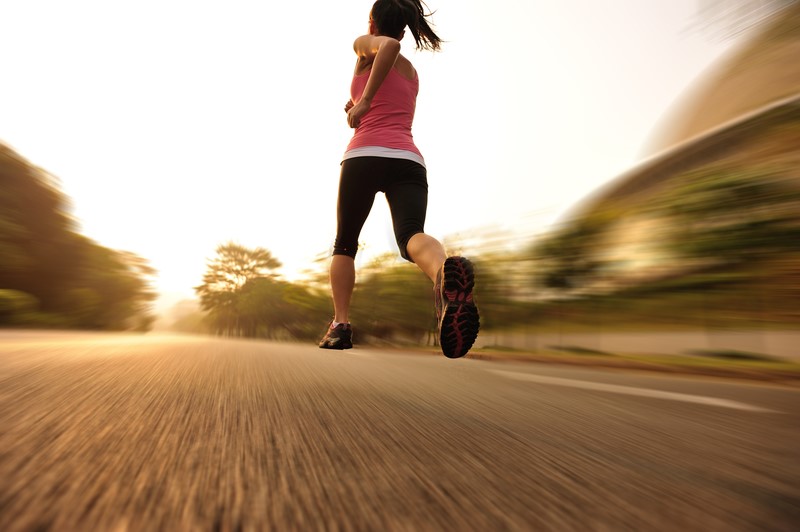
Incorporating motion blur with slow shutter speed can add a unique touch to various photographic genres. In sports photography, it emphasizes the speed and intensity of athletes. In urban scenes, it can highlight the hustle and bustle of city life by blurring pedestrians or vehicles. Landscape photographers often use this technique to smooth out water or clouds, creating a tranquil, dreamlike effect.
For more visual inspiration, you can explore motion blur creative inspiration to see how artists use blur to evoke emotion and movement in their work.
Common Challenges and How to Overcome Them
While using slow shutter speeds opens up creative possibilities, it also presents some technical challenges:
- Camera Shake: Unintentional movement can cause the entire image to blur. Use a tripod or stable surface to keep the camera steady.
- Overexposure: Long exposures can let in too much light. Adjust ISO, aperture, or use ND filters to compensate.
- Focus Issues: Autofocus may struggle in low light or with moving subjects. Consider manual focus for greater control.
Addressing these issues will help you achieve sharp, well-exposed backgrounds with beautifully blurred motion.
Comparing Motion Blur Techniques
There are many ways to incorporate motion into your photography, and each technique offers a different visual impact. For example, panning creates a sense of speed, while static camera blur can emphasize the passage of time. Reviewing motion blur before and after examples can help you understand how different approaches affect the final image.
For a deeper dive into the artistic side, the motion blur cinematic photography guide explores how these effects are used in film and storytelling.
Further Learning and Resources
If you want to expand your knowledge, there are many resources available. For a comprehensive overview, the complete guide to motion blur photography covers advanced techniques, equipment recommendations, and creative ideas to help you master this style.
Frequently Asked Questions
What shutter speed should I use to create motion blur?
The ideal shutter speed depends on the speed of your subject and the amount of blur you want. For fast-moving subjects, try starting at 1/30s or slower. For slower subjects, you may need to use exposures of 1 second or more. Experiment and review your results to find the best setting for your scene.
How can I avoid overexposure when using slow shutter speeds?
To prevent overexposure, lower your ISO, use a smaller aperture (higher f-number), and consider using a neutral density filter. These adjustments reduce the amount of light reaching the sensor, allowing for longer exposures without blowing out highlights.
Can I achieve motion blur effects without a tripod?
Yes, but using a tripod helps keep stationary elements sharp while the moving subject blurs. If you don’t have a tripod, stabilize your camera on a solid surface or embrace handheld techniques like intentional camera movement for more abstract results.