
Motion blur color streak photography is a creative approach that transforms movement into vibrant, flowing lines of color. By intentionally capturing motion, photographers can produce dynamic images that evoke energy and emotion. This style is especially popular for cityscapes, night scenes, and action shots, where the interplay of light and movement creates visually striking results.
Mastering this technique requires an understanding of camera settings, lighting, and composition. Whether you’re a beginner or looking to refine your skills, learning how to control blur and color streaks can open up new possibilities for artistic expression. If you’re seeking inspiration or want to see how others approach this style, you might enjoy browsing motion blur composition examples for a variety of creative ideas.
Understanding the Basics of Motion Blur Photography
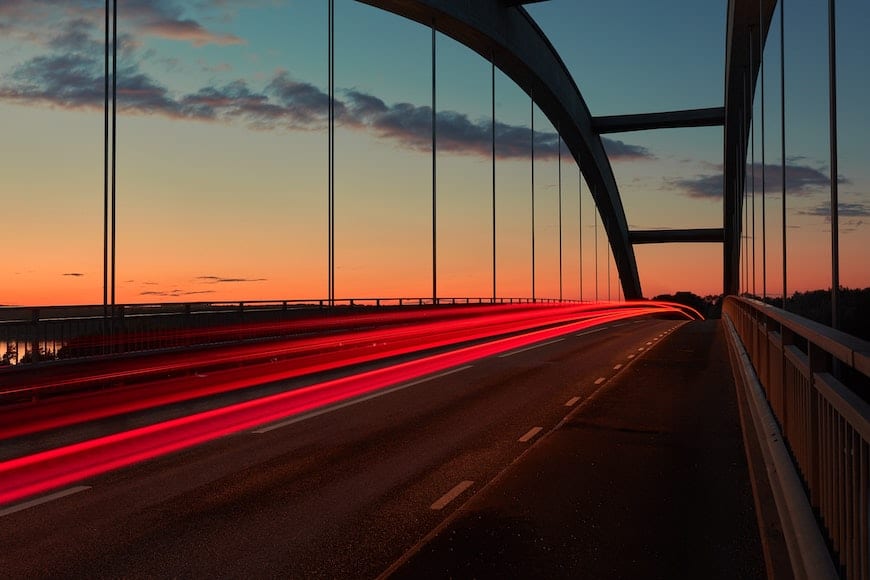
At its core, motion blur is the visible streaking of moving objects in a photograph. This effect occurs when the subject moves during a long exposure, causing light to trail across the sensor. In color streak photography, the focus is on capturing the trails of colored lights or objects, resulting in abstract, energetic images.
To achieve this, you need to use slower shutter speeds, allowing the camera to record movement over time. The length and direction of the blur depend on how fast the subject is moving and how long the shutter remains open. Experimenting with different speeds and movements is key to finding the right balance for your desired effect.
Essential Camera Settings for Color Streak Effects
Getting the technical aspects right is crucial for producing clean, vibrant streaks. Here are the main settings to consider:
- Shutter Speed: Use slower shutter speeds, typically between 1/10 second and several seconds. The exact value depends on the speed of your subject and the amount of blur you want.
- Aperture: A smaller aperture (higher f-number) helps maintain sharpness in stationary elements and controls the amount of light entering the lens during long exposures.
- ISO: Keep ISO as low as possible (e.g., ISO 100 or 200) to reduce noise, especially for night photography.
- Tripod: Using a tripod is essential to keep the camera steady and prevent unwanted blur in the background.
- Manual Focus: Autofocus can struggle in low light or with moving subjects. Switch to manual focus and pre-focus on your intended area.
For those just starting out, the motion blur settings for beginners guide offers a step-by-step approach to dialing in your camera for these effects.

Choosing the Right Subjects and Lighting
Not every scene is suited for color streaks. The most effective images often feature moving lights or brightly colored subjects against a darker background. Here are some popular options:
- City Traffic: Car headlights and taillights create long, colorful lines on busy streets at night.
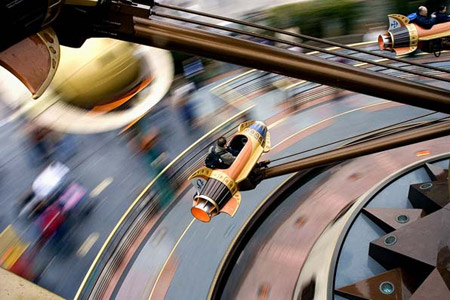
- Amusement Parks: Rides and attractions with vibrant lighting offer swirling patterns and dynamic compositions.
- Fireworks: Exploding colors in the night sky are perfect for dramatic streaks.
- Light Painting: Use handheld lights or glow sticks to draw patterns in the air during a long exposure.
- Neon Signs and Street Lights: Urban environments with varied lighting provide endless opportunities for creative blur.
Timing is also important. Shooting during blue hour or at night enhances the contrast between the lights and the background, making the streaks stand out more vividly.
Creative Techniques for Stunning Color Streaks
Once you’re comfortable with the basics, try experimenting with different methods to add variety to your images:
- Panning: Move the camera along with the moving subject. This keeps the subject relatively sharp while blurring the background, emphasizing speed and direction.
- Zoom Burst: Adjust the zoom ring during a long exposure to create radiating streaks from the center of the frame.
- Intentional Camera Movement (ICM): Deliberately move the camera in a specific direction or pattern while the shutter is open to produce abstract, painterly effects.
- Layering: Combine multiple exposures or blend images in post-processing for more complex streak patterns.
Reviewing motion blur creative inspiration can help spark new ideas for your next shoot.
Common Challenges and How to Overcome Them
While capturing color streaks is rewarding, it comes with its own set of challenges. Here are some tips to address frequent issues:
- Unwanted Camera Shake: Always use a sturdy tripod and, if possible, a remote shutter release or the camera’s self-timer to minimize vibrations.
- Overexposed Highlights: Bright lights can easily blow out in long exposures. Use exposure compensation, a smaller aperture, or neutral density filters to control brightness.
- Focus Issues: Pre-focus manually before starting your exposure, especially in low-light conditions where autofocus may fail.
- Color Casts: Streetlights and neon signs can introduce unwanted color shifts. Adjust white balance in-camera or correct in post-processing for more natural results.
Comparing your results to motion blur before and after examples can help you identify areas for improvement and refine your technique.
Post-Processing Tips for Enhanced Results
Editing plays a significant role in bringing out the best in your motion blur images. Here are some post-processing suggestions:
- Adjust Contrast and Clarity: Boosting contrast can make color streaks pop, while clarity adjustments help define edges.
- Fine-Tune Colors: Use selective color tools to enhance or shift specific hues for a more dramatic effect.
- Crop and Straighten: Refine your composition by cropping out distractions or straightening lines for a cleaner look.
- Reduce Noise: Long exposures, especially at night, can introduce digital noise. Apply noise reduction carefully to maintain detail in the streaks.
Experimenting with different editing techniques can help you develop a unique style and make your images stand out.
Learning from the Pros and Further Resources
Studying the work of experienced photographers is a great way to accelerate your learning. Many professionals share their workflows, tips, and behind-the-scenes insights online. For a comprehensive introduction to this style, check out this in-depth guide to motion blur photography for additional techniques and inspiration.
As you gain confidence, consider exploring more advanced topics such as cinematic effects or combining motion blur with other creative techniques. The motion blur cinematic photography guide is a valuable resource for those looking to push their skills further.
Frequently Asked Questions
What is the best shutter speed for creating color streaks in motion blur photography?
The ideal shutter speed depends on the speed of your subject and the desired length of the streaks. For moving cars or city lights, try starting with 1–5 seconds. Adjust as needed based on your results and ambient lighting conditions.
Do I need special equipment for motion blur color streak photography?
While a DSLR or mirrorless camera with manual controls is preferred, the most critical accessory is a stable tripod to prevent unwanted shake. A remote shutter release or using the camera’s timer can also help reduce vibrations during long exposures.
How can I make my color streaks more vibrant?
To enhance the vibrancy of your streaks, shoot in RAW format for greater editing flexibility, use a low ISO to reduce noise, and experiment with white balance settings. In post-processing, selectively boost saturation and contrast to make the colors stand out.