
Capturing a sense of movement in still images has become a powerful tool for photographers, especially in the world of product imagery. Motion blur in product photography can transform static scenes into dynamic visuals, conveying energy, speed, and a unique story behind each item. When used thoughtfully, this technique not only grabs attention but also helps brands stand out in a crowded marketplace.
Whether you’re a professional photographer or a creative business owner, understanding how to apply motion effects to your product shots can elevate your portfolio. This article explores practical approaches, camera settings, and creative ideas for introducing motion into your product visuals. For those interested in related visual effects, you may also find value in our motion blur effect in graphic design guide, which delves into similar concepts from a design perspective.

Understanding Motion Effects in Product Imagery
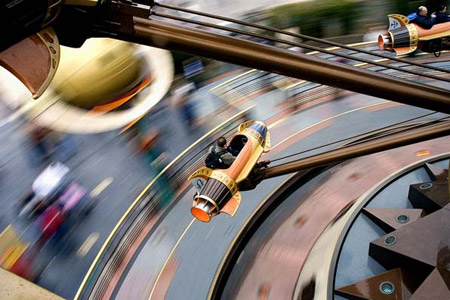
The concept of motion blur in product photography centers on capturing the movement of a subject or background during exposure. This effect is achieved by using slower shutter speeds, allowing moving elements to streak or blur while static parts remain sharp. The result is a compelling contrast between motion and stillness, which can highlight product features or evoke a particular mood.
For example, a sports shoe photographed with a blurred spinning background can suggest speed, while a perfume bottle surrounded by swirling fabric creates a sense of elegance and flow. The key is to balance clarity with movement, ensuring the product remains the focal point.

Essential Camera Settings for Motion Blur
Achieving the right amount of blur requires careful control over your camera’s exposure settings. Here are the main factors to consider:
- Shutter Speed: The most critical setting for motion effects. Slower shutter speeds (such as 1/30s, 1/15s, or even longer) allow more movement to be recorded. The exact speed depends on how fast your subject or background is moving.
- Aperture: A wider aperture (lower f-number) lets in more light, which can help compensate for the reduced light from slower shutter speeds. However, it also affects depth of field, so balance is important.
- ISO: Increase ISO to maintain proper exposure if you’re shooting in low light, but be mindful of noise.
- Tripod: Using a tripod is essential to keep the product sharp while allowing only the intended elements to blur.
Experiment with different combinations to achieve the desired effect. For more technical details and creative ideas, you can explore this comprehensive guide to motion blur photography.
Creative Approaches to Incorporating Motion
There are several ways to introduce movement into your product shots. Here are some popular techniques:
- Panning: Move the camera in sync with a moving product (like a rolling skateboard or spinning watch) while using a slow shutter speed. This keeps the product relatively sharp while blurring the background, emphasizing speed and direction.
- Background Movement: Keep the product still and introduce motion in the background, such as waving fabric, flowing water, or spinning props. This adds energy without compromising product clarity.
- Light Trails: Use handheld lights or LED wands to create streaks of light around the product during a long exposure. This technique works well for tech gadgets, jewelry, or cosmetics.
- Subject Movement: Gently move part of the product (like the lid of a perfume bottle or the hands of a watch) during the exposure to create a subtle blur that draws attention to specific features.
Lighting Considerations for Dynamic Product Shots
Proper lighting is crucial when working with motion effects. Continuous light sources (like LED panels or softboxes) are preferable, as they allow the camera to capture movement throughout the exposure. Flash can freeze motion, so if you want to maintain blur, use flash sparingly or combine it with ambient light for creative results.
Controlling reflections and highlights is also important, especially with glossy products. Use diffusers, reflectors, or flags to shape the light and avoid unwanted glare. Experiment with colored gels or backlighting to add mood and depth to your images.
Post-Processing Tips for Enhancing Motion Effects
While most of the effect should be achieved in-camera, post-processing can help refine the final image. Adjust contrast and clarity to ensure the product stands out against the blurred elements. Use selective sharpening to draw the viewer’s eye to key details.
If needed, you can enhance or add motion effects using editing software. However, be careful not to overdo it—natural-looking blur is more convincing and appealing. For those interested in digital manipulation, our resource on motion blur in 3d rendering offers insights into creating realistic movement in computer-generated imagery.
Common Challenges and How to Overcome Them
Working with motion in product photography presents some unique challenges:
- Unwanted Camera Shake: Always use a sturdy tripod and, if possible, a remote shutter release or timer to prevent accidental movement.
- Overexposure: Slower shutter speeds can let in too much light. Use a lower ISO, smaller aperture, or neutral density filters to maintain correct exposure.
- Loss of Product Detail: Ensure your main subject remains sharp by minimizing movement of the product itself or using selective lighting.
- Distracting Backgrounds: Keep backgrounds simple or use props that complement the product without overwhelming the scene.
When to Use Motion in Product Photography
Not every product benefits from motion effects. This technique works best for items associated with activity, energy, or transformation—such as sports equipment, beverages, electronics, or beauty products. For luxury or highly detailed items, a subtle approach is often more effective.
Consider your brand’s identity and the message you want to convey. Motion can suggest innovation, excitement, or craftsmanship, but it should always serve the story of the product.
Related Visual Effects and Further Learning
If you’re interested in exploring how motion concepts apply in other creative fields, you might enjoy our articles on motion blur in gaming graphics and motion blur in cgi. For those comparing different blur techniques, our guide on motion blur vs gaussian blur highlights the distinctions and best use cases for each effect.
FAQ
How do I keep the product sharp while adding motion blur?
Use a tripod to stabilize your camera and select a slow shutter speed. Keep the product still and introduce movement only in the background or with props. You can also use selective lighting to highlight the product and minimize blur on the main subject.
What shutter speed should I use for motion effects?
The ideal shutter speed depends on the speed of the moving element and the desired amount of blur. Start with 1/30s or 1/15s and adjust as needed. Faster movement or more pronounced blur may require even slower speeds.
Can I create motion blur in editing software?
Yes, many editing programs offer tools to simulate motion effects, but achieving the effect in-camera usually looks more natural. Use digital blur sparingly and focus on enhancing, rather than replacing, the original motion captured in your shot.