
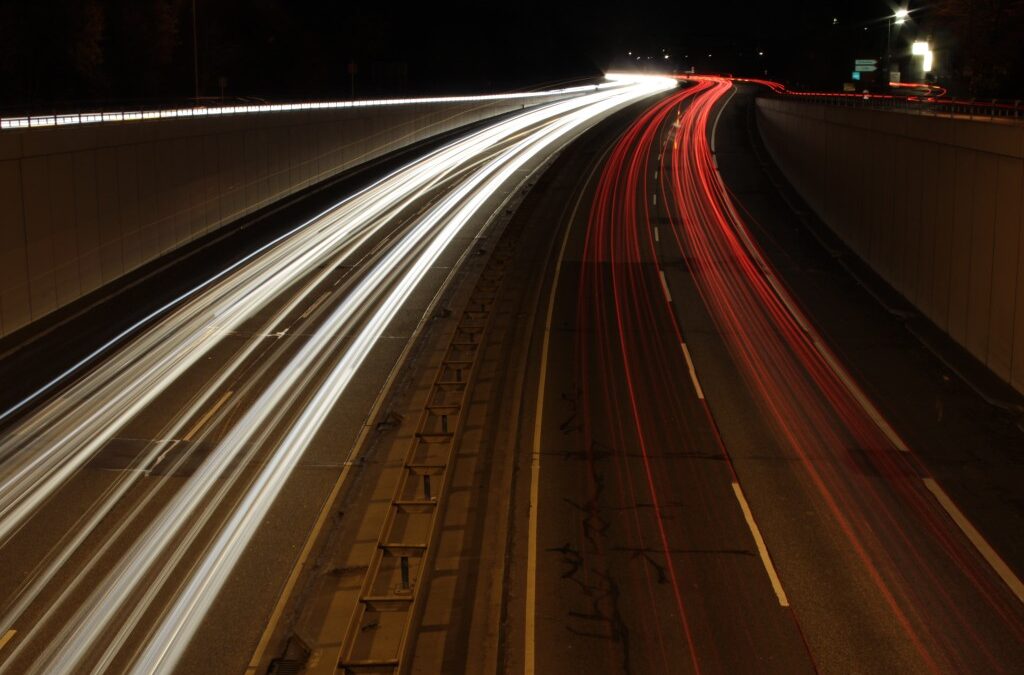
Understanding how motion blur works is essential for anyone interested in photography or video production. This visual effect, where moving subjects appear streaked or smeared, can be used creatively or avoided for crisp, sharp images. Whether you’re capturing fast-moving cars on a highway or shooting a cinematic scene, knowing the mechanics behind this phenomenon helps you make informed decisions about camera settings and artistic intent.
Motion blur occurs when the subject, camera, or both move during the exposure time. The result is a sense of movement or speed, which can add drama and context to still images and video frames. To master this effect, it’s important to explore the technical factors that influence it and the ways it can be harnessed or minimized.
For those interested in understanding the distinctions between similar visual effects, such as the difference between blurred motion and unwanted shake, the article on motion blur vs camera shake provides valuable insights.
What Causes Motion Blur?
At its core, motion blur is a result of movement during exposure. When the camera’s shutter is open, any motion—whether from the subject or the camera itself—will be recorded as a blur. The extent of this effect depends on several factors:
- Shutter Speed: The most influential factor. Slower shutter speeds allow more movement to be captured, increasing the blur.
- Subject Speed: Faster-moving subjects create more pronounced streaks during the same exposure time.
- Camera Movement: Even slight shakes can introduce blur, especially at slower shutter speeds.
- Focal Length: Telephoto lenses magnify motion, making blur more noticeable.
In video, the concept is similar but continuous. Each frame records a slice of time, and the degree of blur within each frame depends on the same principles as in still photography.

How Shutter Speed Influences Blurred Motion
The relationship between shutter speed and how motion blur works is fundamental. A fast shutter speed (such as 1/1000s) freezes action, resulting in sharp images. Conversely, a slow shutter speed (like 1/30s or slower) allows moving subjects to blur across the sensor.
Photographers often use slow shutter speeds intentionally to convey movement—think of waterfalls rendered as silky streams or city lights forming colorful trails. In video, the “180-degree shutter rule” suggests setting the shutter speed to roughly double the frame rate (e.g., 1/50s for 24fps video) to achieve a natural-looking blur that mimics human vision.
However, too much blur can make footage look smeared, while too little can result in a choppy, unnatural appearance. Balancing these factors is key to achieving the desired effect.
Creative Uses of Motion Blur in Visual Storytelling
When used deliberately, motion blur can enhance storytelling by emphasizing speed, direction, or the passage of time. Some common creative applications include:
- Panning: Moving the camera along with a moving subject at a slow shutter speed keeps the subject relatively sharp while blurring the background, highlighting motion.
- Light Trails: Capturing moving lights at night, such as car headlights, creates dynamic lines that add energy to urban scenes.
- Sports and Action: A touch of blur on fast-moving athletes can convey intensity and excitement.
- Abstract Effects: Intentional camera movement or zooming during exposure can produce artistic, abstract images.

Controlling and Minimizing Unwanted Blur
While motion blur can be a powerful creative tool, there are times when it’s undesirable. To minimize it:
- Use a faster shutter speed to freeze motion.
- Stabilize your camera with a tripod or image stabilization technology.
- Increase ISO or open the aperture to allow for faster exposures in low light.
- Ask subjects to remain as still as possible during the shot.
If you’re unsure whether the blur in your image is due to subject movement or camera shake, reviewing resources like the motion blur vs camera shake guide can help clarify the difference.
Motion Blur in Video Production
In filmmaking and video, the appearance of blur is closely tied to the chosen shutter angle and frame rate. Following the 180-degree shutter rule provides a natural look, but breaking this rule can create stylized effects:
- Short Shutter Angles: Reduce blur for a crisp, staccato effect (often used in action scenes).
- Long Shutter Angles: Increase blur for a dreamy or disorienting appearance.
Editors may also add or reduce blur in post-production to match the desired aesthetic. Understanding the technical side of how motion blur works allows for more intentional choices both during shooting and in editing.
Technical Factors Affecting Blurred Motion
Several camera settings and environmental factors influence the amount and quality of blur:
- Aperture: A wider aperture lets in more light, enabling faster shutter speeds and reducing blur, but also affects depth of field.
- ISO: Raising ISO allows for faster exposures but can introduce noise.
- Lighting Conditions: Bright environments make it easier to use fast shutter speeds, while low light often requires slower exposures.
- Lens Choice: Longer lenses exaggerate motion, making blur more apparent.
For a deeper dive into capturing this effect, the Adorama guide to capturing motion blur in photography offers practical tips and examples.
Common Mistakes and How to Avoid Them
Beginners often struggle with unintended blur or struggle to achieve the effect when desired. Here are some pitfalls to watch for:
- Using too slow a shutter speed without stabilization, resulting in overall image softness.
- Not tracking the subject accurately during panning, causing both subject and background to blur.
- Overlooking the impact of focal length and subject distance on the appearance of blur.
- Failing to adjust ISO or aperture to compensate for changing light conditions.
Practice and experimentation are the best ways to learn how to control this effect and use it to enhance your visual storytelling.
FAQ
What is the difference between motion blur and camera shake?
Motion blur results from the movement of the subject during exposure, while camera shake is caused by unintended movement of the camera itself. The two can look similar but have different solutions and creative uses. For a more detailed comparison, see the motion blur vs camera shake article.
How can I intentionally add motion blur to my photos?
To create intentional blur, use a slower shutter speed and either move the camera (panning) or photograph a moving subject. Experiment with different speeds and techniques to achieve the desired effect.
Why does video sometimes look choppy without motion blur?
When the shutter speed is too fast relative to the frame rate, each frame is very sharp, causing motion to appear staccato or unnatural. Following the 180-degree shutter rule helps maintain a smooth, cinematic look by allowing a natural amount of blur in each frame.