

Understanding how motion blur interacts with frame rate is essential for anyone working with video, whether you’re a filmmaker, content creator, or simply looking to improve the look of your footage. The relationship between shutter speed, frame rate, and motion blur shapes the visual style and realism of moving images. This motion blur frame rate guide will break down the core concepts, practical settings, and creative choices you need to know to achieve the right look for your projects.
By mastering the balance between frame rate and motion blur, you can create everything from cinematic, natural-looking movement to crisp, hyper-real visuals. We’ll cover the science, the settings, and the artistic implications, so you can make informed decisions for any shooting scenario.
For those interested in creative applications and visual inspiration, you may also want to explore motion blur composition examples for a deeper dive into artistic approaches.
How Frame Rate Influences Motion Blur
The amount of blur you see in moving objects within a video is directly affected by the frame rate you choose. Frame rate refers to the number of individual frames captured per second (fps). Common frame rates include 24fps (film standard), 30fps (broadcast), and 60fps (high-motion or slow-motion capture).
- Lower frame rates (such as 24fps) naturally produce more motion blur when paired with slower shutter speeds. This is because each frame captures a longer slice of time, allowing more movement to be recorded as blur.
- Higher frame rates (such as 60fps or above) tend to produce crisper motion, as each frame represents a shorter time interval. This results in less blur, unless you deliberately slow down the shutter speed.
Choosing the right combination depends on the mood and realism you want to achieve. For example, action scenes in movies often use 24fps for a cinematic feel, while sports broadcasts may use 60fps for clarity and detail.

Shutter Speed and Its Role in Motion Blur
While frame rate sets the rhythm of your video, shutter speed controls how much blur appears in each frame. The classic rule of thumb is to set your shutter speed to double your frame rate (the “180-degree shutter rule”). For example, shooting at 24fps means using a shutter speed of 1/48 or 1/50 second.
This setting creates a natural amount of blur that our eyes are accustomed to seeing in movies. Deviating from this rule can produce different effects:
- Faster shutter speeds (e.g., 1/250s at 24fps): Results in sharper, more staccato motion, often used for action or sports to freeze movement.
- Slower shutter speeds (e.g., 1/24s at 24fps): Increases blur, which can be used for dreamlike or surreal effects, but may look unnatural if overdone.
Balancing frame rate and shutter speed is the foundation of any motion blur frame rate guide, as it determines the core visual style of your footage.
Creative Uses of Motion Blur in Video
Motion blur isn’t just a technical consideration—it’s a powerful creative tool. The right amount of blur can add emotion, realism, or stylization to your video. Here are some popular approaches:
- Cinematic look: 24fps with a 1/48s shutter speed delivers the classic filmic motion blur that audiences expect from movies.
- Hyper-real clarity: 60fps or higher with fast shutter speeds creates ultra-sharp motion, often used in sports, video games, or slow-motion sequences.
- Stylized effects: Intentionally slow shutter speeds at any frame rate can create ghosting, trails, or dreamy visuals for music videos and experimental films.
For more inspiration on how to use blur creatively, check out the motion blur creative inspiration resource for artists and filmmakers.
Choosing the Right Settings for Your Project
There’s no single “correct” setting for every situation. Instead, consider these factors when adjusting your frame rate and shutter speed:
- Project type: Narrative films typically use 24fps, while documentaries or YouTube content may use 30fps or 60fps for a more immediate feel.
- Lighting conditions: Slower shutter speeds let in more light, which can be helpful in low-light environments but may introduce unwanted blur.
- Desired mood: More blur feels organic and immersive, while less blur feels clinical and precise.
- Distribution platform: Some platforms or broadcast standards may require specific frame rates.
Experimenting with different combinations is the best way to find what works for your story and style. Beginners can get a solid foundation by reviewing a motion blur settings for beginners guide, which covers the basics in more detail.
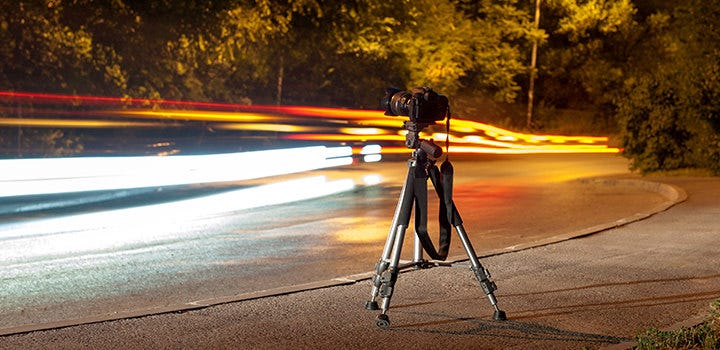
Comparing Motion Blur at Different Frame Rates
To see the impact of frame rate and shutter speed in action, try filming a moving subject at 24fps, 30fps, and 60fps, each with both the standard and a faster shutter speed. You’ll notice:
- At 24fps with a 1/48s shutter, motion appears smooth and cinematic.
- At 60fps with a 1/120s shutter, movement is crisp and detailed, with less blur.
- Using a very fast shutter at any frame rate can make motion look choppy or unnatural, which may be desirable for certain effects.
For a visual comparison and more detailed breakdowns, you might find the motion blur before and after examples guide helpful.
Common Mistakes and How to Avoid Them
Even experienced videographers sometimes struggle with balancing frame rate and motion blur. Here are some frequent pitfalls:
- Ignoring the 180-degree rule: Using a shutter speed that’s too fast or too slow for your chosen frame rate can result in unnatural motion.
- Overcompensating for light: Slowing down the shutter to brighten footage can introduce excessive blur. Instead, use lighting or ISO adjustments.
- Mixing frame rates: Combining footage shot at different frame rates can lead to inconsistent blur and disrupt visual continuity.
To master these technical and creative aspects, you can learn from professionals who specialize in the subject. For example, this comprehensive article on mastering motion blur in studio photography offers valuable insights that translate well to video work.
Advanced Tips for Controlling Motion Blur
Once you’re comfortable with the basics, consider these advanced techniques to refine your results:
- Use ND filters: Neutral density filters allow you to use slower shutter speeds in bright conditions without overexposing your footage, preserving natural blur at any frame rate.
- Experiment with variable frame rates: Some cameras allow you to shoot at non-standard rates for unique effects, such as overcranking (shooting at a higher frame rate for slow motion).
- Post-production adjustments: Software plugins can add or reduce blur in editing, but the most authentic results come from getting it right in-camera.
For those interested in the artistic side, the motion blur cinematic photography guide provides further reading on using blur for storytelling and mood.
FAQ: Motion Blur and Frame Rate in Video
What is the 180-degree shutter rule and why is it important?
The 180-degree shutter rule states that your shutter speed should be set to approximately double your frame rate (e.g., 1/50s for 25fps). This creates natural-looking motion blur that mimics how the human eye perceives movement, resulting in footage that feels smooth and cinematic.
Can I fix motion blur problems in post-production?
While some editing tools can reduce or add blur, it’s best to capture the desired effect in-camera. Excessive blur or overly sharp footage can be difficult to correct after shooting, and artificial blur may not look as natural.
How do I choose the best frame rate for my video?
Consider your project’s style, platform, and subject matter. For a traditional film look, use 24fps. For sports or fast action, 60fps offers more clarity. Always pair your frame rate with an appropriate shutter speed to control motion blur effectively.
Conclusion
Mastering the relationship between frame rate and motion blur is key to producing professional-quality video. By understanding how these settings interact, you can shape the mood, realism, and style of your footage. Whether you’re aiming for a classic cinematic look or experimenting with creative effects, the principles outlined in this motion blur frame rate guide will help you make informed choices for any project.