

Capturing dynamic scenes after sunset or indoors often leads to images with blurred movement. For many photographers, mastering motion blur in low light photography is both a creative challenge and an opportunity to produce striking, atmospheric photos. Whether you want to convey speed, energy, or the passage of time, understanding how to control and use motion blur can transform your night and low-light shots.
In this guide, you’ll find practical advice for achieving intentional blur, troubleshooting common issues, and making the most of your camera settings. If you’re looking for more inspiration, you might enjoy exploring motion blur composition examples to see how other photographers use these techniques in their work.
Understanding Motion Blur in Dim Environments
Motion blur occurs when moving subjects are captured with a slow shutter speed, causing them to appear streaked or smeared across the image. In low light, slower shutter speeds are often necessary to let in enough light, making blur more likely—sometimes unintentionally. However, with the right approach, you can use this effect to add energy and mood to your photos.
Key factors influencing blur include:
- Shutter speed: The slower it is, the more movement is recorded.
- Subject speed: Faster subjects create more pronounced trails.
- Camera stability: Handheld shots can introduce both subject and camera shake blur.
Essential Camera Settings for Capturing Motion in Low Light
To intentionally create or control motion blur in low light photography, start by adjusting your camera’s exposure settings. Here’s what to focus on:
- Shutter Speed: Experiment with speeds between 1/10 and several seconds, depending on how much blur you want. For light trails or moving crowds, longer exposures work best.
- Aperture: Use a wide aperture (low f-number) to allow more light in, which helps compensate for slower shutter speeds.
- ISO: Increase ISO to boost sensitivity, but be mindful of noise. Modern cameras handle higher ISO better, but always review your images for grain.
Manual mode or shutter priority mode (S/Tv) gives you the most control. Don’t forget to check your histogram and review images on your camera’s screen to fine-tune exposure.

Stabilizing Your Camera for Sharp and Blurred Results
When working with slow shutter speeds, stabilizing your camera is crucial to avoid unwanted shake. Here are some practical options:
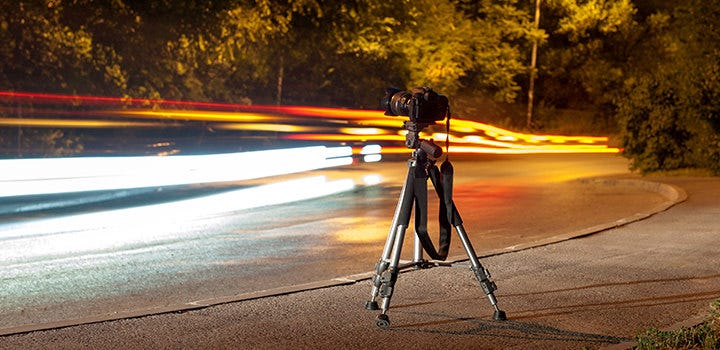
- Tripod: The most reliable way to keep your camera steady during long exposures.
- Remote Shutter Release or Timer: Prevents camera movement when pressing the shutter button.
- Image Stabilization: Many modern lenses and cameras offer built-in stabilization, which helps when shooting handheld at moderately slow speeds.
If you want to combine a sharp subject with a blurred background (or vice versa), try panning—moving your camera along with the subject’s motion during the exposure. This technique requires practice but can yield dramatic results, especially with moving vehicles or people.
Creative Uses of Motion Blur in Night and Indoor Photography
Intentional blur can add artistry and storytelling to your images. Here are a few ideas to experiment with:
- Light Trails: Capture the movement of cars, bicycles, or even handheld lights to create colorful streaks.
- Flowing Water: Use longer exposures to smooth out rivers, fountains, or rain for a dreamy effect.
- Busy Streets: Blur crowds to emphasize the energy of a city while keeping static elements sharp.
- Abstract Effects: Move your camera intentionally (ICM—Intentional Camera Movement) to create painterly images.
For more inspiration on creative approaches, check out these motion blur creative inspiration ideas for artists.
Troubleshooting Common Issues with Blurred Images
While blur can be creative, sometimes it’s unwanted. Here’s how to address typical problems:
- Too much blur: Use a faster shutter speed, increase ISO, or open your aperture wider.
- Unwanted camera shake: Use a tripod or rest your camera on a stable surface. Activate image stabilization if available.
- High noise: Balance ISO settings and consider noise reduction in post-processing.
- Focus problems: Use manual focus or single-point autofocus to ensure your subject is sharp before shooting.
Reviewing your images on location helps catch issues early, so you can adjust settings and retake shots as needed.
Advanced Tips for Artistic Motion Effects in Low Light
Once you’re comfortable with the basics, try these advanced techniques to elevate your low-light motion photography:
- Rear Curtain Sync Flash: Fire the flash at the end of the exposure to freeze your subject while retaining motion trails behind them.
- Multiple Exposures: Some cameras allow you to combine several exposures in-camera for layered motion effects.
- ND Filters: Use neutral density filters to enable longer exposures even in brighter low-light conditions, such as cityscapes at dusk.
For a deeper dive into studio techniques, you can read this comprehensive guide to mastering motion blur in studio photography.
Post-Processing to Enhance or Reduce Motion Blur
Editing software can help you refine your images after the shoot. Here’s how:
- Sharpening: Apply selective sharpening to areas you want to keep crisp.
- Noise Reduction: Use tools like Lightroom or Photoshop to minimize grain from high ISO settings.
- Selective Blur: Add or enhance blur in post for creative emphasis, or use de-blur tools to rescue slightly shaky images.
Always work on a copy of your original file to preserve your initial capture. Experiment with different adjustments to find the look that best matches your creative vision.
Frequently Asked Questions
What shutter speed should I use for motion blur in low light?
The ideal shutter speed depends on your subject and the amount of blur you want. For subtle trails, try 1/10 to 1/2 second. For dramatic effects like light trails or moving crowds, exposures of several seconds may be needed. Always test and adjust based on your scene.
How do I avoid unwanted camera shake in low light?
Use a tripod or stable surface to keep your camera steady. If you don’t have a tripod, brace your body against a wall or use image stabilization. A remote shutter release or the camera’s timer function also helps prevent shake from pressing the shutter button.
Can I fix motion blur in editing software?
Minor blur from camera shake can sometimes be reduced with sharpening or de-blur tools in programs like Photoshop. However, heavy blur from subject movement is usually not fully correctable. It’s best to get your settings right in-camera whenever possible.
Conclusion
Learning to work with motion blur in low light photography opens up a world of creative possibilities. By understanding your camera settings, stabilizing your gear, and experimenting with different techniques, you can turn challenging lighting conditions into opportunities for unique and expressive images. For more technical advice, you might find the motion blur settings for beginners guide especially helpful as you refine your approach.