
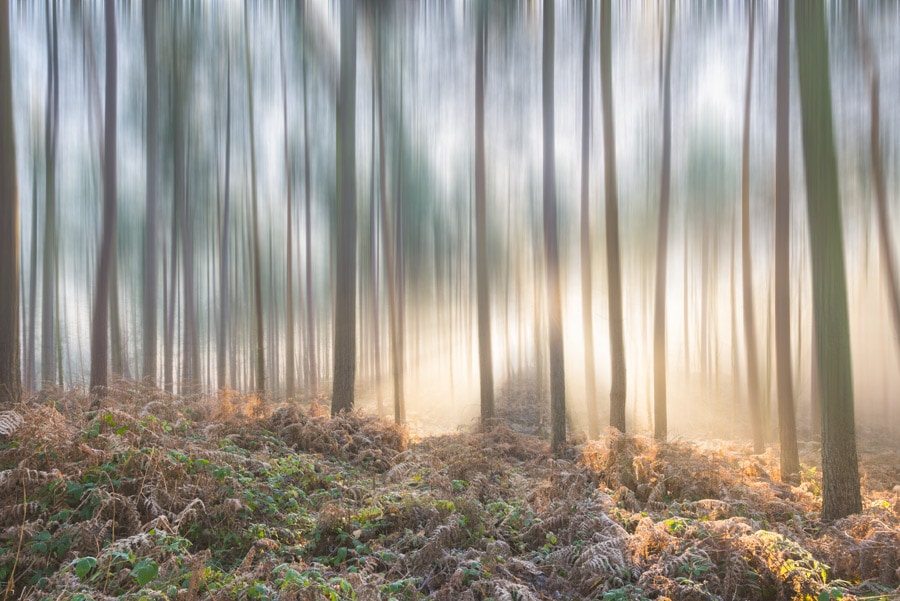
Motion blur time exposure is a powerful photographic technique that transforms ordinary scenes into dynamic, visually compelling images. By intentionally using longer shutter speeds, photographers can capture the movement of subjects—such as flowing water, bustling city streets, or swaying trees—creating a sense of energy and passage of time within a single frame. This guide explores the essentials of achieving beautiful motion blur effects, from camera settings and gear to creative approaches and troubleshooting tips.
Whether you’re a beginner experimenting with your first long exposures or an experienced photographer refining your skills, understanding the principles behind motion blur can open up new creative possibilities. For those seeking inspiration, you might also explore motion blur composition examples to see how different artists approach this technique in various genres.
Understanding Motion Blur and Time Exposure
At its core, motion blur time exposure involves using a slow shutter speed to record the movement of subjects or the camera itself. When the shutter remains open for a longer period, any movement in the scene appears as streaks or soft trails, while stationary objects remain sharp. This effect can evoke a sense of speed, tranquility, or surrealism, depending on how it’s applied.
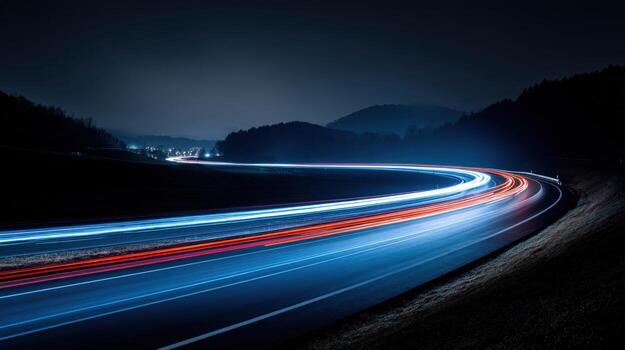
Some of the most iconic examples include light trails from cars at night, silky waterfalls, and abstract patterns created by intentional camera movement. For a deeper dive into cinematic uses, see the motion blur cinematic photography guide.
Essential Equipment for Capturing Motion Blur
While you can experiment with motion blur using almost any camera, certain equipment will help you achieve more consistent and creative results:
- Camera with Manual Controls: A DSLR or mirrorless camera that allows manual adjustment of shutter speed is ideal.
- Tripod: To keep static elements sharp and avoid unintended camera shake, a sturdy tripod is essential for most time exposures.
- Neutral Density (ND) Filters: These filters reduce the amount of light entering the lens, enabling longer exposures even in bright conditions.
- Remote Shutter Release: Minimizes vibrations when pressing the shutter button, especially for exposures longer than one second.
Having the right gear ensures that you can focus on creativity rather than technical limitations.
Camera Settings for Effective Motion Blur
Mastering the technical side of motion blur requires understanding how to balance shutter speed, aperture, and ISO. Here’s a breakdown of the key settings:
- Shutter Speed: The most critical factor. For visible blur, start with speeds between 1/10 second and several seconds, depending on subject movement. Faster subjects (like cars) may need shorter exposures, while slow-moving elements (like clouds) benefit from longer times.
- Aperture: Use a smaller aperture (higher f-number) to increase depth of field and allow for longer exposures without overexposing the image.
- ISO: Keep ISO as low as possible to minimize noise, especially during long exposures.
Experimentation is key. Take multiple shots at different settings to find the right balance for your scene. For those just starting out, the motion blur settings for beginners resource provides a practical starting point.
Creative Approaches to Motion Blur Time Exposure
There are many ways to use motion blur creatively in your photography:
- Light Trails: Capture the movement of vehicles or city lights at night for dramatic, colorful streaks.
- Flowing Water: Use long exposures to turn rivers, waterfalls, or ocean waves into smooth, misty surfaces.
- Intentional Camera Movement (ICM): Move the camera during exposure to create abstract patterns and painterly effects.
- People in Motion: Blur crowds or dancers to convey energy and rhythm, while keeping the environment sharp.
- Nature and Landscapes: Show the passage of time by blurring clouds, wind-blown grass, or swaying trees.
For more inspiration and before-and-after comparisons, check out the motion blur before and after examples guide.

Common Challenges and How to Overcome Them
While motion blur time exposure can yield stunning results, it also presents unique challenges. Here are some common issues and solutions:
- Unwanted Camera Shake: Always use a tripod and, if possible, a remote shutter release or your camera’s timer function.
- Overexposure: In bright conditions, use an ND filter to reduce light and allow for longer shutter speeds without blowing out highlights.
- Focus Problems: Pre-focus on your subject before switching to manual focus to lock it in place during the exposure.
- Noise in Long Exposures: Keep ISO low and enable your camera’s long exposure noise reduction feature if available.
Addressing these challenges will help you achieve cleaner, more professional results in your motion blur photography.
Post-Processing Tips for Motion Blur Images
Editing plays a crucial role in enhancing the impact of your time exposure photographs. Here are some recommended steps:
- Adjust Contrast and Exposure: Fine-tune brightness and contrast to emphasize the motion effect.
- Sharpen Static Elements: Use selective sharpening to make stationary parts of the image pop against the blurred areas.
- Reduce Noise: Apply noise reduction to smooth out grain introduced during long exposures.
- Crop for Composition: Don’t hesitate to crop your image to strengthen the overall visual flow and balance.
For creative ideas and artistic approaches, the motion blur creative inspiration page offers further insights.
Showcasing and Learning from Others
Studying the work of other photographers is one of the best ways to refine your own style. There are many online galleries and tutorials dedicated to motion blur and time exposure. For a curated selection of outstanding examples, visit this collection of beautiful motion blur photos for inspiration and analysis.
Analyzing how others use color, composition, and timing can help you develop a more intentional approach to your own images.
FAQ
What shutter speed should I use for motion blur?
The ideal shutter speed depends on the subject’s speed and the desired effect. For subtle blur, try 1/10 to 1/2 second. For dramatic trails or smoothing water, exposures of several seconds or longer may be necessary. Experimentation is key to finding the right balance.
Do I need a tripod for time exposure photography?
Using a tripod is highly recommended for most motion blur shots, as it keeps static elements sharp and prevents unintended camera shake. However, for intentional camera movement techniques, handholding the camera can produce creative results.
How can I avoid overexposing my images during long exposures?
To prevent overexposure, use a low ISO setting, a small aperture (high f-number), and consider adding a neutral density filter to reduce incoming light. Adjust your exposure settings based on ambient lighting conditions and review your histogram to ensure proper exposure.