
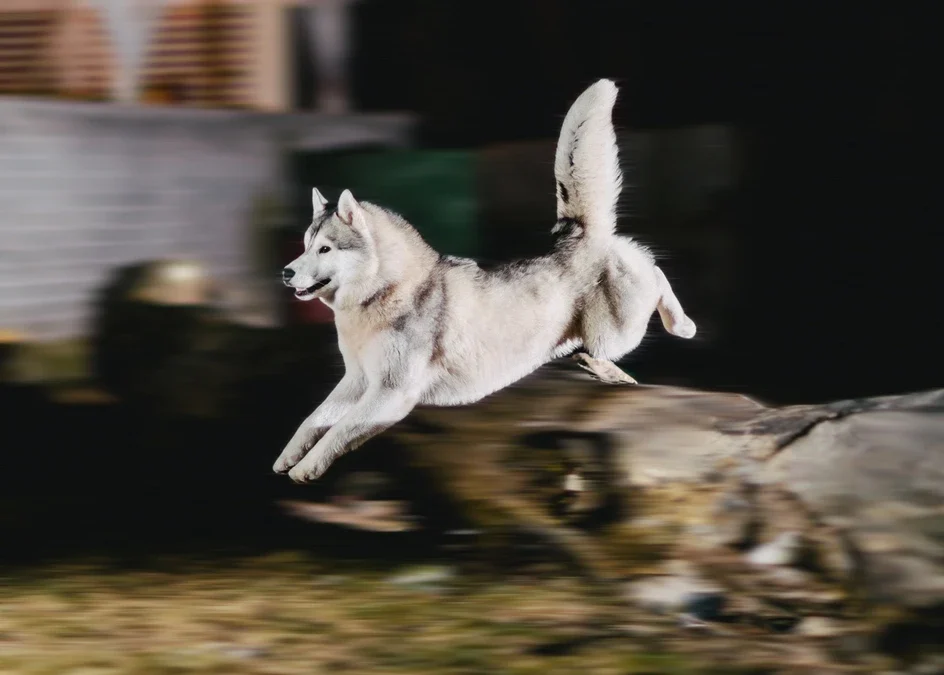
Understanding the motion blur vs ghosting effect debate is essential for photographers, videographers, and display enthusiasts alike. Both phenomena are related to the way moving subjects are captured or displayed, but they stem from different causes and have distinct visual outcomes. Whether you’re aiming for creative photography or troubleshooting display issues, recognizing these differences can help you achieve the results you want and avoid unwanted artifacts.
If you’re interested in creative uses of motion blur, you might find inspiration in these motion blur composition examples, which showcase how intentional blur can enhance visual storytelling.
Defining Motion Blur and Ghosting: What Sets Them Apart?
To distinguish between motion blur and ghosting effect, it’s important to start with clear definitions:
- Motion blur occurs when a moving subject appears smeared or streaked in a photo or video frame. This is typically the result of a slow shutter speed or a camera panning technique, where the movement is captured over a period of time.
- Ghosting effect refers to faint, repeated images or outlines that trail behind a moving object. In photography, this can happen due to multiple exposures or reflections. On digital screens, ghosting is often caused by slow pixel response times, resulting in visual artifacts during fast motion.
While both effects involve movement, their causes and visual signatures are quite different. Motion blur is often used intentionally for artistic purposes, whereas ghosting is usually an unwanted artifact.
How Motion Blur Occurs in Photography and Displays
The motion blur phenomenon is most commonly associated with photography and videography. It happens when the camera’s shutter remains open long enough to capture the movement of a subject. The result is a smooth, continuous streak that conveys a sense of speed or movement.

In digital displays, motion blur can also occur when the refresh rate is too low or the pixel response time is not fast enough, causing moving images to appear smeared. However, this is distinct from ghosting, which has a different technical cause.
For those new to photography, learning about motion blur settings for beginners can help you control this effect and use it creatively.
Understanding Ghosting: Causes and Visual Impact
The ghosting effect is characterized by the appearance of secondary, semi-transparent images trailing behind the main subject. In photography, this can occur due to lens flare, internal reflections, or double exposures. In digital displays, ghosting is typically caused by slow pixel transitions, where pixels do not change color quickly enough to keep up with fast-moving content.

Unlike motion blur, which produces a smooth streak, ghosting creates distinct, repeated outlines that can be distracting or reduce image clarity. This is especially noticeable in fast-paced scenes, such as sports broadcasts or video games.
Comparing Motion Blur and Ghosting Effect in Practice
When comparing motion blur vs ghosting effect in real-world scenarios, several key differences emerge:
| Aspect | Motion Blur | Ghosting Effect |
|---|---|---|
| Cause | Slow shutter speed, intentional camera movement, low display refresh rate | Slow pixel response, multiple exposures, reflections |
| Appearance | Smooth, continuous streaks | Faint, repeated outlines or images |
| Intentional Use | Often used for artistic effect | Rarely intentional, usually unwanted |
| Common Contexts | Photography, cinematography, some displays | Display technology, lens issues, double exposure |
Understanding these differences can help you identify which effect you are seeing and how to address or leverage it in your work.
Creative Uses of Motion Blur and How to Avoid Ghosting
Many photographers and filmmakers use motion blur to convey movement, energy, and emotion. Techniques such as panning, long exposures, and intentional camera shake can create dynamic images that stand out. For more ideas, explore this motion blur creative inspiration guide.
On the other hand, ghosting effect is rarely desirable. To minimize ghosting in photography, use high-quality lenses, avoid shooting through glass, and check for unwanted reflections. In digital displays, choosing monitors with fast pixel response times and enabling motion enhancement features can reduce ghosting artifacts.
Technical Solutions and Best Practices
Addressing motion blur and ghosting effect requires different approaches:
- To reduce motion blur in photography, use faster shutter speeds and stabilize your camera. In displays, opt for higher refresh rates.
- To combat ghosting, select displays with low response times and update firmware when available. In photography, check for lens cleanliness and avoid multiple exposures unless intended.
For a deeper dive into the technical aspects of motion blur, consider reading this comprehensive guide to motion blur from Expert Photography.
Frequently Asked Questions
What is the main difference between motion blur and ghosting?
The main difference lies in their appearance and cause. Motion blur results in smooth streaks due to subject or camera movement during exposure, while ghosting creates faint, repeated outlines caused by slow pixel transitions or multiple exposures.
Can motion blur and ghosting occur together?
Yes, it’s possible for both effects to appear in the same image or video, especially in situations involving fast movement and technical limitations, such as slow shutter speeds combined with display lag.
How can I intentionally use motion blur in my photography?
To create intentional motion blur, use a slower shutter speed and track your subject’s movement with the camera. Experiment with different speeds and techniques to achieve the desired artistic effect.
Conclusion
Recognizing the distinction between motion blur and ghosting effect is valuable for anyone working with images or displays. While motion blur can be a powerful creative tool, ghosting is typically an artifact to avoid. By understanding their causes and characteristics, you can better control your visual results and troubleshoot issues as they arise. For more practical examples and tips, explore resources like motion blur before and after examples or a motion blur cinematic photography guide to further refine your skills.