

Capturing the energy and excitement of live events often means going beyond traditional sharp images. Motion blur event photography is a creative approach that uses controlled blur to convey movement, atmosphere, and emotion. Whether you’re shooting concerts, sports, or bustling parties, mastering this technique can help your photos stand out by telling a dynamic story.
In this guide, you’ll discover practical advice for achieving compelling results with motion blur at events. We’ll cover camera settings, creative techniques, and common challenges, so you can confidently experiment and elevate your event photography skills. If you’re interested in exploring how these techniques apply to specific subjects, take a look at our motion blur motorsports photography guide for more inspiration.
Understanding Motion Blur in Event Photography
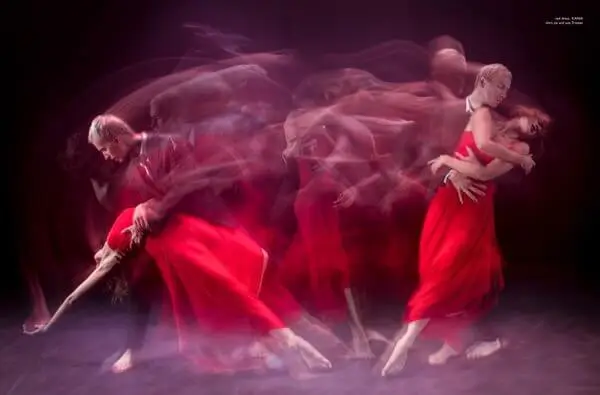
Motion blur is the visual streaking or smearing of moving subjects in a photo. In the context of events, it’s used intentionally to highlight action—like a dancer’s spin, a musician’s gesture, or a runner’s sprint. The effect is achieved by using a slower shutter speed, allowing moving elements to blur while stationary parts remain sharp.
Unlike accidental blur caused by shaky hands, creative motion blur is a deliberate choice. It adds a sense of pace and vibrancy, making viewers feel as if they’re part of the scene. When done well, it can turn an ordinary event shot into a visually engaging image.
Essential Camera Settings for Dynamic Blur Effects
To achieve motion blur event photography effects, start by switching your camera to manual or shutter priority mode. Here are the key settings to consider:
- Shutter Speed: The most critical factor. Speeds between 1/10 and 1/60 second often work well, but the ideal value depends on how fast your subject is moving. Experiment with slower speeds for more pronounced blur.
- Aperture: Use a smaller aperture (higher f-number) to increase depth of field and help keep stationary elements sharp. If you need more light, open up the aperture, but be mindful of focus.
- ISO: Keep ISO as low as possible to reduce noise, but increase it if you’re shooting in low light and need a faster shutter speed.
- Stabilization: Use a tripod or monopod when possible, especially if you want the background to remain sharp while the subject blurs.
Many cameras offer image stabilization, which can help reduce unintended blur from hand movement. However, for intentional motion blur, the goal is to let the subject move while you keep the camera steady.
Techniques to Enhance Motion Blur at Events
There are several creative approaches to using blur in event settings. Here are some of the most effective:
- Panning: Track a moving subject with your camera while using a slow shutter speed. This keeps the subject relatively sharp while blurring the background, emphasizing speed and direction.
- Static Camera, Moving Subject: Keep the camera still and let the subject move through the frame. This works well for dancers, athletes, or performers on stage.
- Zoom Blur: Twist the zoom ring during a long exposure to create radial blur effects, adding energy to concert or party shots.
- Light Trails: Capture moving lights—such as glow sticks, stage lighting, or sparklers—to add colorful streaks to your images.

Common Challenges and How to Overcome Them
While motion blur event photography can be rewarding, it comes with its own set of obstacles. Here’s how to address some frequent issues:
- Too Much Blur: If your subject is unrecognizable, try increasing the shutter speed slightly or using burst mode to capture multiple frames.
- Not Enough Blur: If the effect is too subtle, slow down your shutter speed further or encourage more movement from your subject.
- Low Light: Event venues are often dim. Use fast lenses (wide apertures), increase ISO, or add external lighting if possible. Be mindful of noise and exposure.
- Focus Issues: Autofocus can struggle in low light or with moving subjects. Pre-focus on a spot where the action will happen, or use manual focus for more control.
For more detailed technical advice and creative ideas, check out this comprehensive tutorial on motion blur techniques.
Creative Inspiration: Subjects and Scenarios
Motion blur isn’t limited to one type of event. Here are some scenarios where these techniques shine:
- Concerts: Capture musicians’ movements, swirling lights, and energetic crowds.
- Sports: Emphasize the speed of runners, cyclists, or skaters. For more on specific sports, explore our motion blur running photography and motion blur skating photography guides.
- Parties and Nightlife: Show the movement of dancers, DJs, and vibrant lighting.
- Parades and Festivals: Convey the motion of floats, performers, and crowds.
If you’re interested in outdoor or action-based subjects, our motion blur bicycle photography tips and motion blur ocean waves photography guide provide additional inspiration.
Editing and Post-Processing for Motion Blur Shots
Post-processing can help you fine-tune your images and enhance the blur effect. Here are some editing tips:
- Adjust Contrast and Clarity: Boosting contrast can make blurred areas pop, while clarity adjustments can help define the sharp parts of your image.
- Selective Sharpening: Apply sharpening only to the subject or static elements to increase separation from the blurred background.
- Color Grading: Use color adjustments to emphasize mood—cool tones for calm scenes, warm tones for energetic ones.
- Cropping: Reframe your image to focus attention on the most dynamic areas.
Remember, editing should enhance your creative vision, not fix technical mistakes. Aim to preserve the authentic energy captured in your original shot.
Frequently Asked Questions
What shutter speed should I use for motion blur at events?
The ideal shutter speed depends on your subject’s speed and the amount of blur you want. For most event scenarios, try starting between 1/10 and 1/60 second. Adjust based on your results—faster speeds for subtle blur, slower for more dramatic effects.
How do I keep part of my photo sharp while the rest is blurred?
Use panning techniques or keep your camera steady while the subject moves. Focus on a stationary object or pre-focus on a spot where the action will occur. A tripod or monopod can help maintain sharpness in the non-moving areas.
Can I create motion blur effects with a smartphone?
Yes, many smartphones offer manual or “pro” modes that let you control shutter speed. Use a tripod or stable surface to avoid unwanted shake, and experiment with slower shutter settings. There are also apps designed to simulate long exposure effects.